

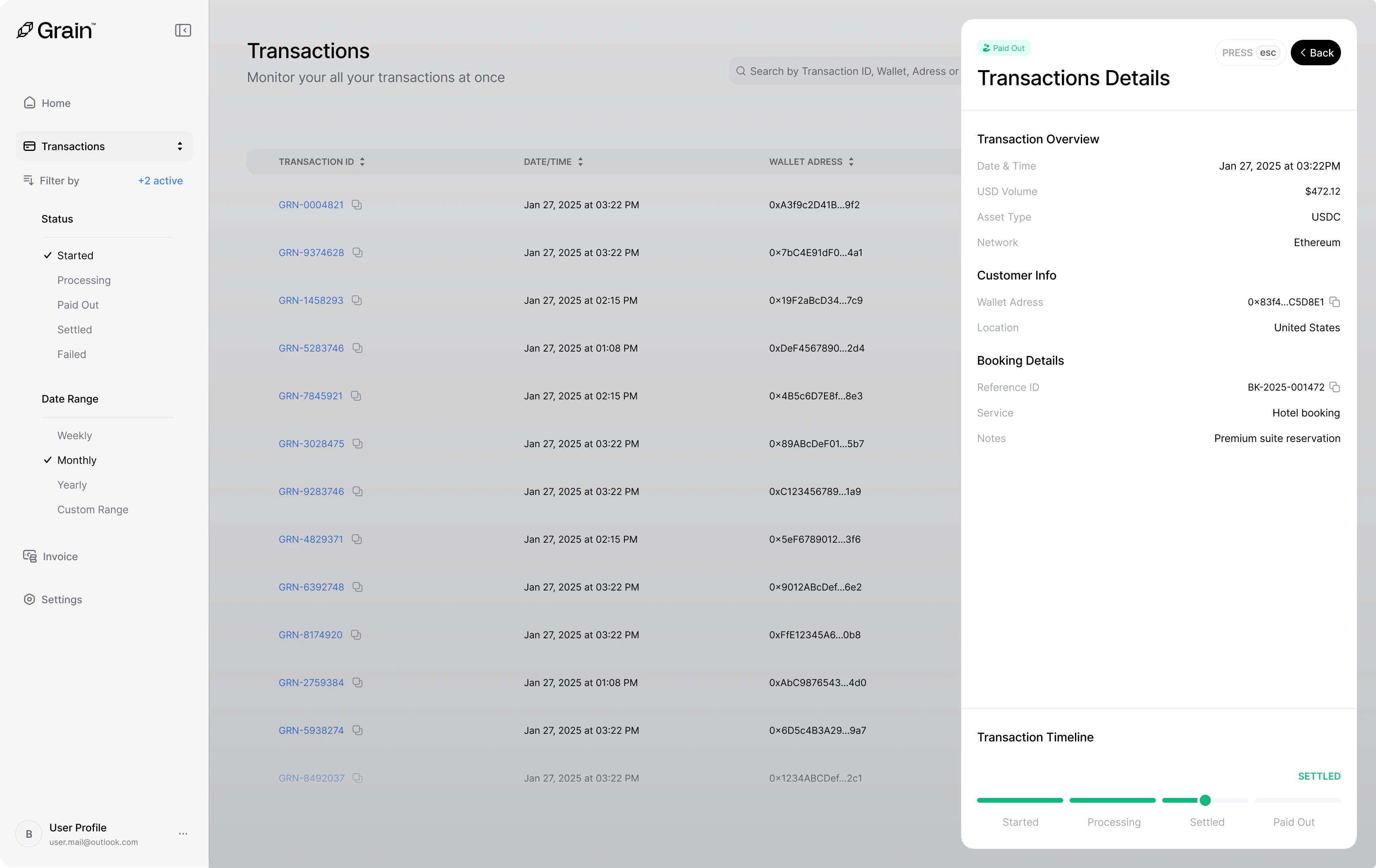
Transaction Overview
The top section displays the core payment information:- Date & Time — When the transaction was initiated (e.g., Jan 27, 2025 at 03:22PM)
- USD Volume — The transaction value in USD
- Asset Type — The cryptocurrency used for the payment (e.g., USDC)
- Network — The blockchain network the payment was processed on (e.g., Ethereum)
Customer Info
Details about the customer who made the payment:- Wallet Address — The wallet that sent the payment
- Location — The customer’s country of origin
Booking Details
If your integration passes booking metadata, this section displays:- Reference ID — Your internal booking reference (e.g.,
BK-2025-001472) - Service — The type of service or product purchased
- Notes — Any additional details associated with the booking
Transaction Timeline
The timeline at the bottom tracks each stage the transaction has passed through. Each step is visually connected so you can see exactly where the payment is in its lifecycle:- Started — Payment session created
- Processing — Payment detected on-chain
- Settled — Funds confirmed and settled
- Paid Out — Funds transferred to your payout account